Free for iPhone

Log the migraine while it's happening. Not from memory, three weeks later.

A private migraine diary for iPhone. Pain, side, symptoms and medication in a few taps. Your month on a calendar, your entries as charts, a PDF for your next appointment.

  • Free
  • No account
  • Stays on your device

Migrania does not provide medical diagnosis, treatment, or advice.

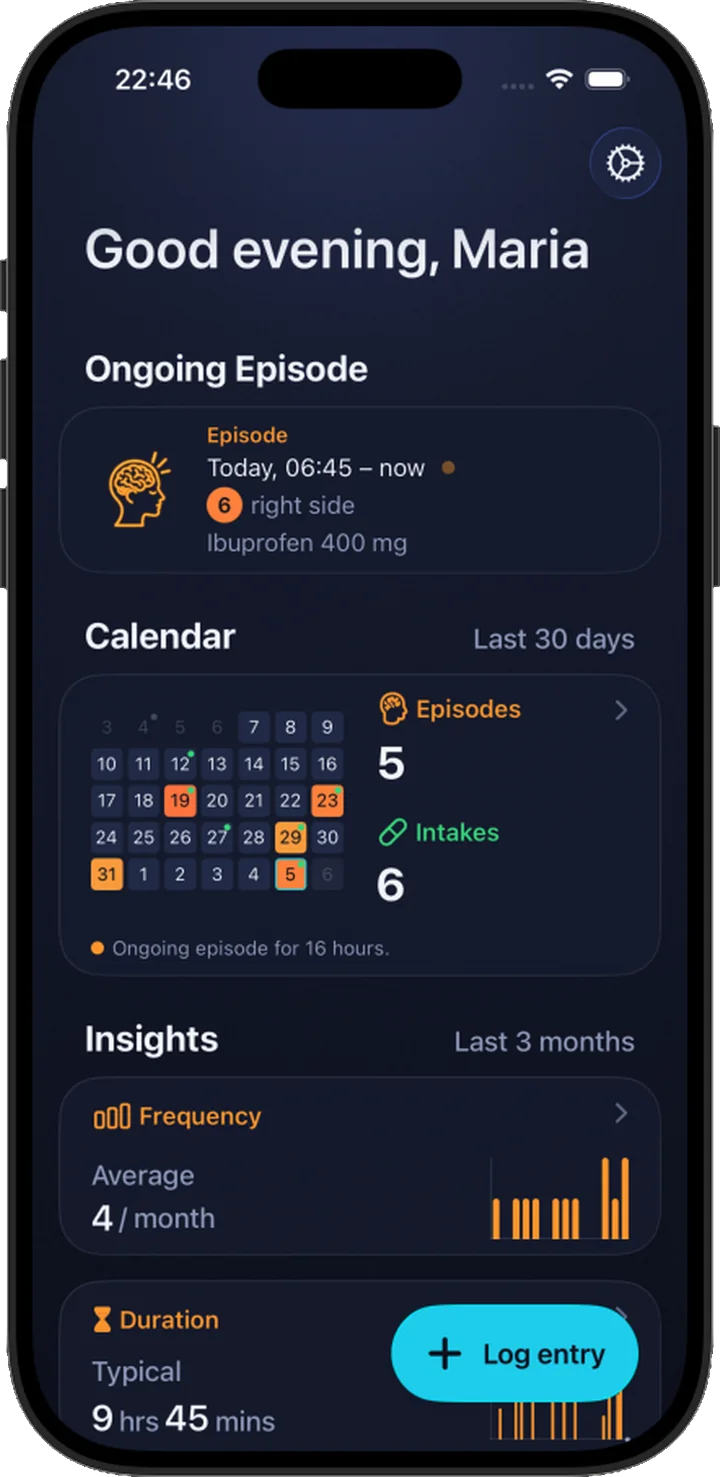
Migrania overview screen: an ongoing episode, the calendar of the last 30 days with five episodes and six intakes, and insights on frequency and duration.

Why keep a diary

There is no test for migraine.

No scan, no blood test, no EEG can confirm it. Migraine is diagnosed from what you can describe, plus an examination and ruling out other causes. What you bring to the appointment is the material.

What a doctor asks

  1. 01

    How often, and how severe

    Attacks per month, how long each one lasted, how bad the pain got.

  2. 02

    What came with it

    Aura, nausea, sensitivity to light, which side of the head.

  3. 03

    What you took, and when

    Which medication, at what time, on which days.

Source: The Migraine Trust, “Getting your migraine diagnosed”

Three months later, nobody has this from memory. A diary does.

Migrania is that diary: fast enough to fill in during an attack, and your entries become a PDF you can bring to your next appointment.

Just the essentials, done well.

Four things a migraine diary has to do. Nothing that gets in the way.

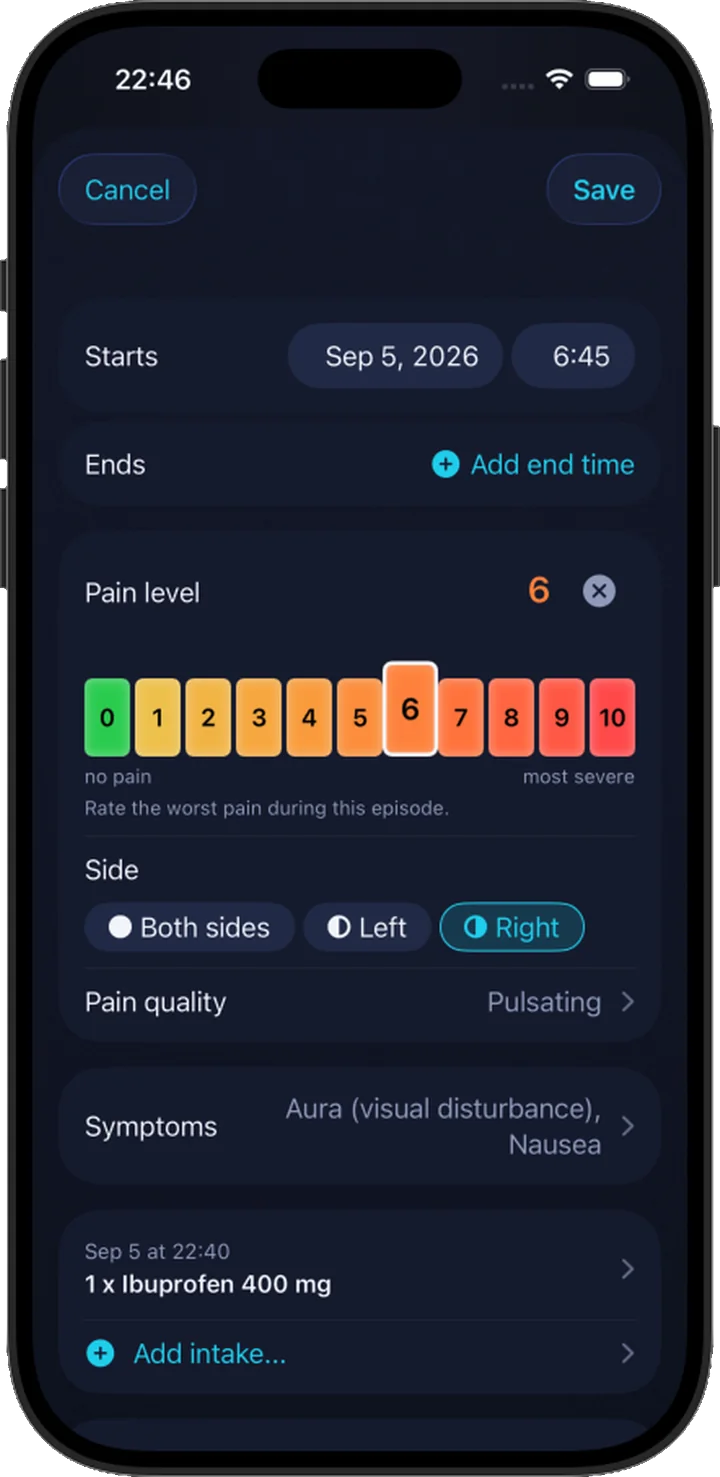
The episode form in Migrania: start time, a colour pain scale set to 6, side chips, pain quality, symptoms and a logged Ibuprofen intake.

Log

Open, tap, save.

A new episode starts with sensible defaults. Pain level, side, pain quality and symptoms are chips you tap, not fields you type. Save right away and add details later, or never.

  • Pain from 0 to 10 on a colour scale
  • Side, pain quality and symptoms as tap-to-select chips
  • Medication intakes with dose and time
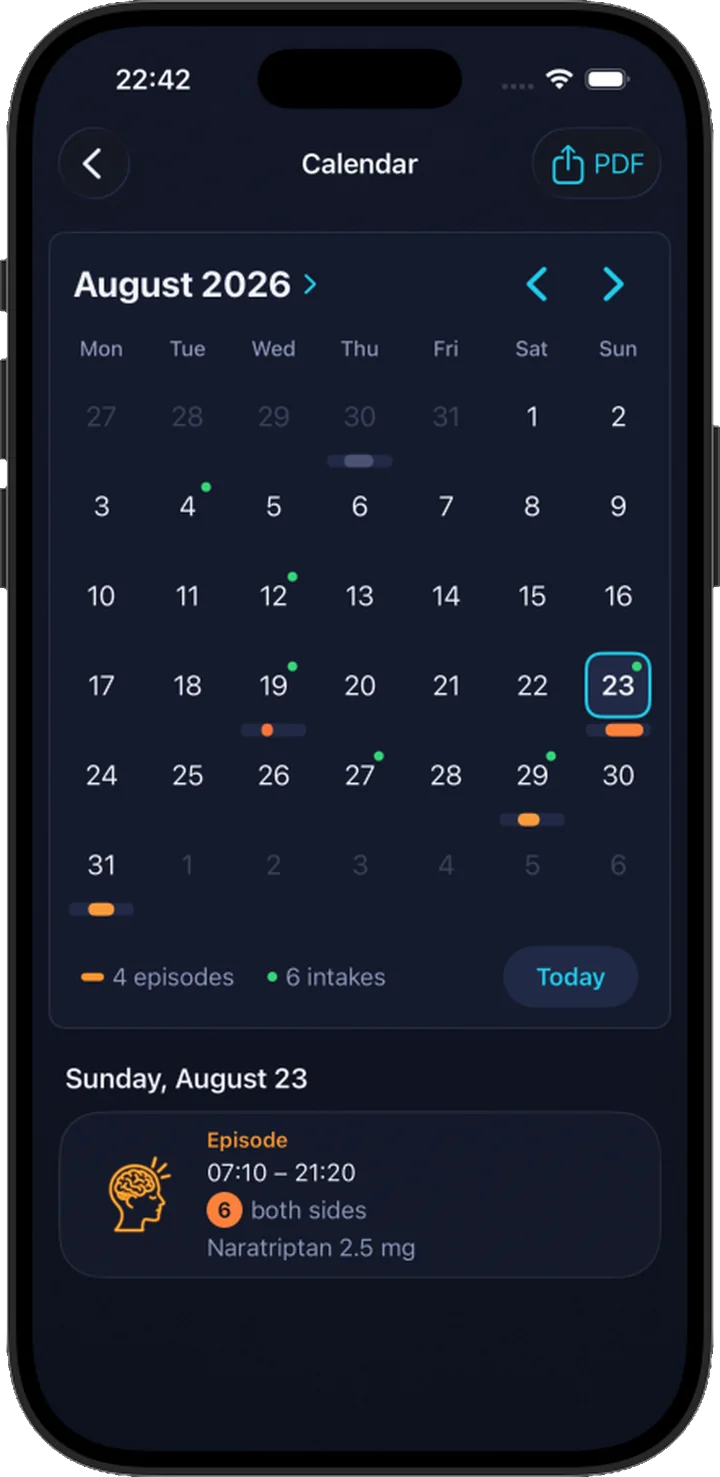
The Migrania calendar for August with episodes and intakes marked, and the selected day's episode listed below.

Calendar

Your month at a glance.

Every episode and every intake on one calendar. Tap a day to see what you logged, jump back a month, or export the month as a PDF right from here.

  • Episodes and intakes marked per day
  • Ongoing episodes shown while they run
  • PDF export straight from the calendar
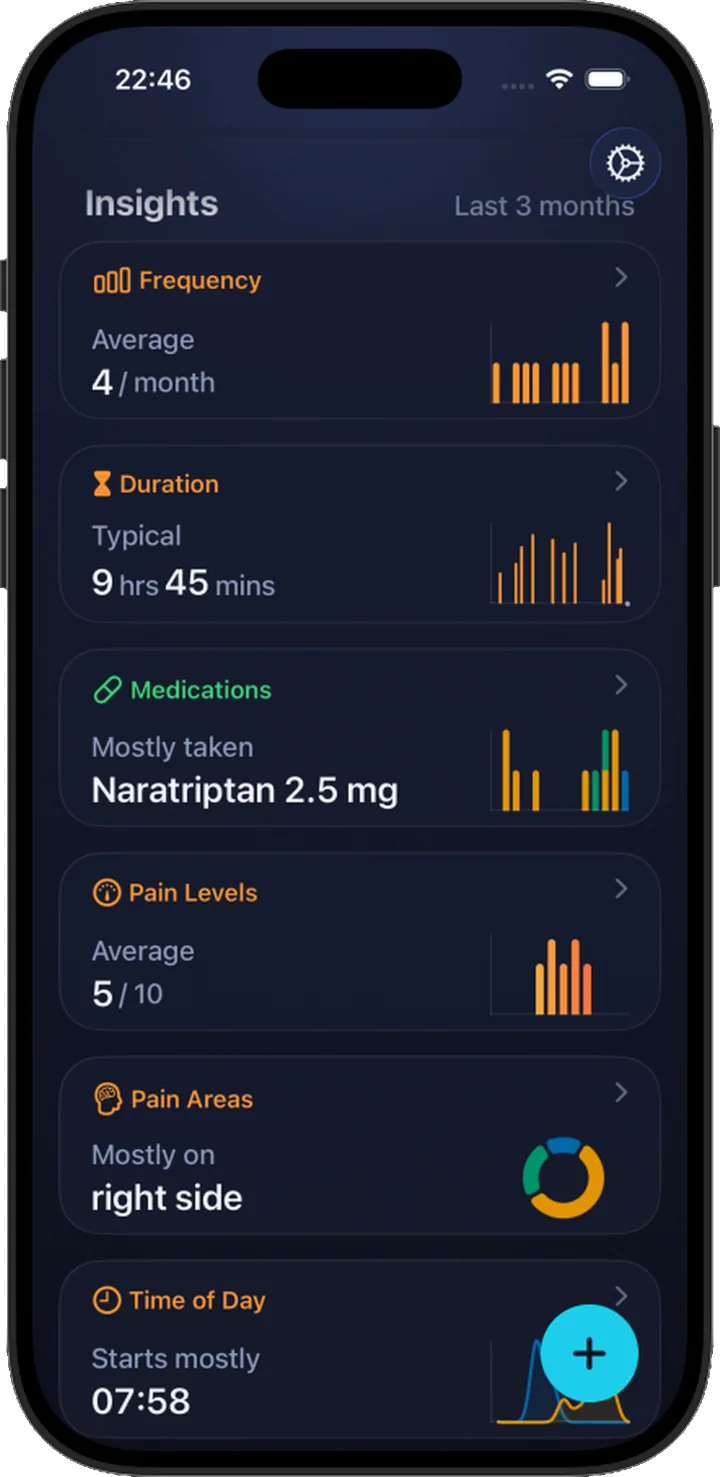
The Migrania insights screen with tiles for frequency, duration, medications, pain levels, pain areas and time of day.

Insights

Your own entries, as charts.

Frequency, typical duration, pain levels, which side, what time of day episodes tend to start, and which medication you logged most. All of it from your own entries, shown as they are.

  • Frequency, duration and pain levels
  • Medications and pain areas
  • Any range from one month to a year
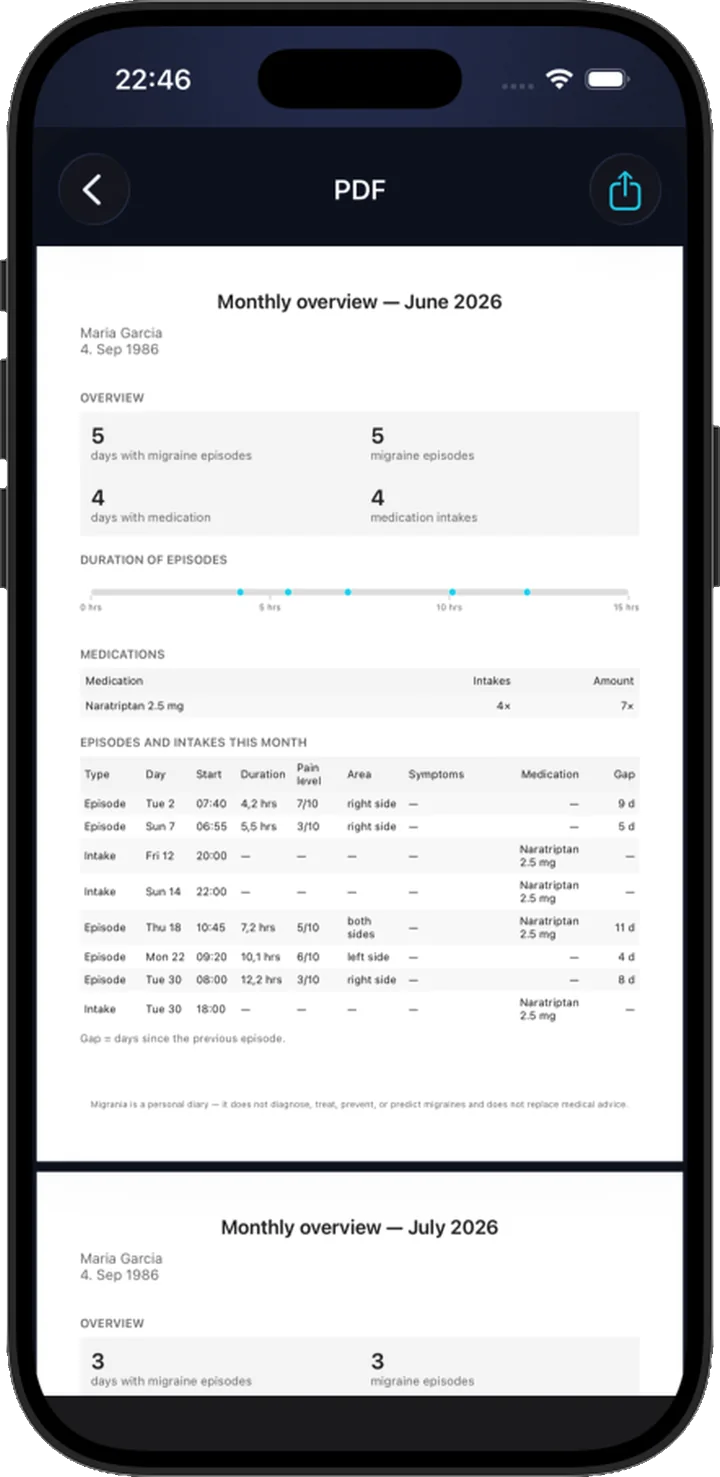
A monthly overview PDF generated by Migrania with counts, a duration chart, a medication table and a list of all entries.

PDF

A PDF for the appointment.

One clean monthly overview: days with episodes, intakes, durations, and every entry in a table. Generate it in the app, then share it as a file or print it.

  • Monthly overview with every entry
  • Medication table with intakes and amounts
  • Share or print straight from the app

Private by design.

A diary is personal. Migrania is built so that nobody else can read yours, including us.

On your device

Your entries are stored on your iPhone. If you turn on iCloud sync, they travel end-to-end encrypted through your own private iCloud, which neither Apple nor we can read.

No account

Nothing to sign up for. Open the app and log your first episode.

Free

No subscription, no in-app purchases, no ads.

Backup & export

Export your diary to a backup file and restore it on a new iPhone. Your data is never locked in.

lives with migraine and builds Migrania

Why I built Migrania

Christopher, the developer of Migrania
I had my first migraine when I was five. I'm 32 now.

I rarely had the paper diary from my doctor's office handy. Many apps made tracking tedious with long forms. I wanted to log my attacks quickly, even during a migraine, and later see at a glance what I had recorded over time.

That's why I built Migrania. I've been using it myself for two years. It helps me keep track: When did I have attacks? How often am I taking medication? What have I recorded over the past months? At my appointments, I can show my own entries instead of relying on memory.

Migrania keeps growing through my own experience and your feedback. I'd love for you to try it and tell me what's missing.

As glad as I am that you found Migrania, I wish you didn't need it in the first place.

— Christopher

Frequently asked questions

The essentials about Migrania

What is Migrania?

Migrania is a migraine diary for iPhone. You log your episodes and medication intakes in seconds, see them on a calendar, get descriptive charts of your own entries, and can export a PDF report for your next appointment. Free, without an account.

How fast is logging an episode?

Seconds. A new episode opens with sensible defaults, and you pick details from tap-to-select chips instead of typing. You can save right away without adding anything else, fast enough to do during a migraine.

What can I record?

For each episode you can record when it started and ended, the pain level, side and quality, symptoms, and any medication you took, plus a free-text note. Add only what you want.

Is my data private?

Yes. Your entries live on your device. If you turn on iCloud sync, they stay end-to-end encrypted in your own private iCloud, which neither Apple nor we can read. There is no account, and sync is off by default.

Does Migrania sync between my devices?

Optionally. iCloud sync is off by default. When you turn it on, your diary syncs across your iPhones through your own private iCloud, end-to-end encrypted with keys from your iCloud Keychain, so neither Apple nor we can read it. Leave it off and everything stays on your device.

How much does Migrania cost?

Nothing. Migrania is free on the App Store, with no subscription and no in-app purchases.

Start your diary today.

Free on the App Store. No account, no subscription. Your first entry takes seconds.

Download on the App Store
  • Free
  • No account
  • Stays on your device

Have a question or some feedback? We'd love to hear from you. contact@migrania.app